A website? I should focus on the content instead. Make it simple, I said to myself, make it simple, and write in Notion and publish in Notion.
Well, well, well, simple turned out to be buggy.
Long story short, if you subscribe to Notion through the Play Store, you can't add your own domain. I'd have to cancel and resubscribe through Notion's website to unlock that feature, and I didn't want to wait, so I pivoted.
There's one thing I've learned with my job: when you find a bug, you find something else with it. Usually it's another bug, but in this case it was the push I needed to finally learn a new skill: coding with AI.
Sure I could have gone with a website builder like Wordpress or Wix, but why would I use a drag-and-drop builder, when I could use a type-and-build machine?
Where to start?
The looks of it was my starting point. I gave Claude two main design guidelines: a bullet journal background and a Nine Inch Nails vibe. That probably sums up half of my personality, but I also added a pdf export of my LinkedIn profile and the Notion Site I already had to provide more context. And really, with just that, a beautiful, functional and responsive website was born.
But where do I type what I want? And where do I push the actual code to build the website? And once I have the website, how will it become online for others to view? Once it's online, where will I keep writing my blog posts? How can I register my website with my own domain? If I want subscribers, what's the best platform for a newsletter? What's Github and do I need it?
You may feel the questions are endless because you're just starting. But do not be fooled: that also happens for every other person. There will be different questions, all right, but you're not learning if you stop asking questions.
Claude Code is an amazing tool, but it is not the only tool you need. If you want to build, host and publish a website there are a lot of other things that come into play.
I sure am fortunate to have a software engineer for a partner who was willing to sit down with me on this. Extra fortunate for his patience, because if I had to choose just one thing I'm good at, it would be asking why. And if you're anything like me and have a software engineer willing to sit with you, hold on to them. That's your time to ask all your questions.
The book analogy
Let's say you wrote a book and you have it all ready from the print shop. Now you want the world to read it, so you distribute it. But first you ensure it can be identified and you give it an ISBN (check the bar code in the back cover of your books, they all have it). Sure, a reader will look for a book by name and author, but the library/bookshop system needs a more precise search method: a unique number (ISBN) that will point precisely to your book, and not any other. Now that your book is searchable, it's ready to be shelved at a bookshop/library, and anyone looking for it will know exactly which one to go to. It's pretty much the same for your website.
For this, I first did a few things in different places:
- Hostinger: where I registered my own domain acatarinamiranda.com
- Netlify: where my website is published
A visitor types your domain name — that's the ISBN of your book. Behind the scenes, this is what happens so your visitor reaches your website: Hostinger registers your domain in a global directory and gives it an IP address that points to where your domain is hosted — Netlify — which is the library or bookshop, the place storing and serving your content to the public.
The building
You may have noticed I haven't included Claude Code in the published book analogy in the previous section. That's because I wanted a dedicated section for how we actually write the book — build the website, that is.
⚠️ Before you even start: get a laptop with more than 8GB memory. My old Macbook was almost coughing as Claude was running on VSC. Luckily, the perks of the engineer partner is that he had a 32GB laptop lying around here at home that I could use.
Here's what I installed before I started writing:
- Visual Studio Code (VSC): the editor where all the code is written
- Claude Code in VSC: the tool that actually writes all the code
- Homebrew: a sort of app store that makes it easier to install other stuff like Git and Node.js
If VSC is the printing shop where I got my book together, Node.js is the printing machine that actually ran the job — software engineers call it "runtime". Git and the GitHub account I created are the (very sophisticated) drawers where I saved all my work. So if I lost a version I liked, Git would remember it and GitHub would save it all in the cloud for me to access from any laptop. Short answer to "do I need it?": yes. GitHub is also the bridge between your code and your live website — it's how the code gets pushed to Netlify to go live.
What is Claude Code, then?
I'm getting to it, but first get a Claude subscription. The free plan does not include Claude Code, so you will need a paid plan. The cheapest is around 20 EUR per month (see their pricing page). Once you have your Claude account, install it in VSC and make sure you're choosing Claude Code by Anthropic.
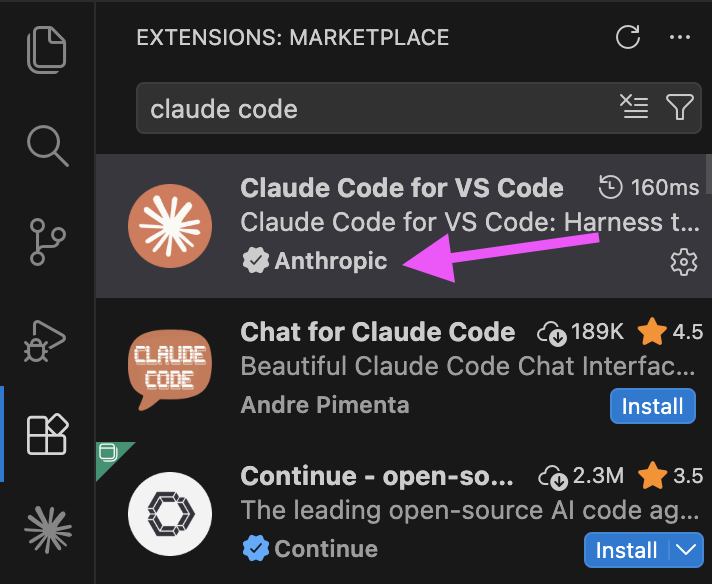
Claude Code is my magical pen! 🦄 While I'm the one doing all the writing (prompting), Claude Code is the tiny magical software developer living inside VSC and turning all my prompts into an actual website. And not only does Claude Code write code fluently, it also searches the web for answers, reads screenshots, edits and manages multiple files on your computer, and even helped me write this blog post, which makes it both the subject and the co-author!
My requests
-
Writing in Notion: I was not going to write my blog posts in a code editor. Notion is just better for writing, so I set up the Notion MCP and problem solved. Claude can now read & write to my private Notion account.
That introduced a new question: how do I take content written in Notion and turn it into blog posts that look consistent on my website? Claude's answer was Eleventy, a static site generator. Basically, Eleventy takes my content (Markdown files) and turns it into clean HTML files, all following the same template. That means if I ever want to redesign my site, I change the template once and every single post updates with it.
-
Newsletter: Claude gave me a step by step, with different alternatives to choose from. I chose to set up MailerLite, an European tool with double opt-in, because I'd rather have a small list of people who actually want to be there than a big list of people who forgot they subscribed. I'm not interested in collecting email addresses.
The form was straightforward. It's always the setting up of the DNS records that is a bit more confusing and time consuming. I had to ensure I was adding the exact SPF record in the platform where my website DNS records are, and then wait for DNS propagation.
-
Website analytics: Claude suggested Plausible and I went with it. The software engineer here at home recommended it too, and I trusted. It's a privacy-first tool, requires no cookie banner, and has a clean dashboard that tells you what actually matters: which posts people are reading, where they're coming from, and how many showed up. One script tag in your HTML and that's it.
Where to go from here?
I never coded a line in my life before this. I barely understood what an IDE or terminal was. I had only ever built websites on Wix, and written on Blogspot and Medium.
Could I have taken an easier road? Probably. Substack would have given me a newsletter and a blog in one place, with zero setup. Lovable or similar tools would have built me a website without ever opening a terminal. Those are valid choices, and if your goal is just to get words out into the world, they might even be the right ones.
My goal with all this was to understand how things work, and I wanted something that was fully mine to tweak, expand and re-design at my own will.
AI gives you the possibility to use your own language to build stuff. You no longer need to learn the trinity of web development — CSS, HTML or JavaScript — to launch a website. AI will do all the translation for you. Yet while AI gives you agency it does not necessarily give you expertise. That will depend on your eagerness to learn — do you want to know how things are built, or do you just want them built? There's no wrong answer, just different paths.
Started with a website. Ended up with a skill.